Just ask your assistant.
Connect Visulixx once and ask in plain words: "Render this elevation in V-Real at dusk", "Which of my models are in Kakinada?", "Where's the sun at 4 pm on 21 June in Hyderabad?" Your assistant uses your Visulixx account to do it.
Part of 3D StudioOpening to early-access studios first

How to use it · 3 steps
Step by step.
- 1
Make a key
app.visulixx.com → 3D Studio → Export → Connect SketchUp & AI assistants → Make a key.
- 2
Add Visulixx to your assistant
Paste the short set-up snippet from our guide into your assistant's settings (one time).
- 3
Ask
Render, check renders, list models, sun position — in plain words.
What you get
Visulixx in your AI assistant, in short.
Questions
Good to know.
Which assistants work?
Any app that supports MCP — Claude Desktop, Claude Code, Cursor and more.
Does it use my credits?
Renders use your credits as usual. Listing models and sun lookups are free.
Is it available now?
Opening with the 3D Studio to early-access studios first.
Works well with
Next steps.
 Live
AI Render Studio
Any elevation export to a photoreal render in about a minute — checked against your drawing before you see it.
How it works → Early access
3D Studio
Upload your real model, walk it in the browser, light it with the true sun and render any view — nothing invented.
How it works →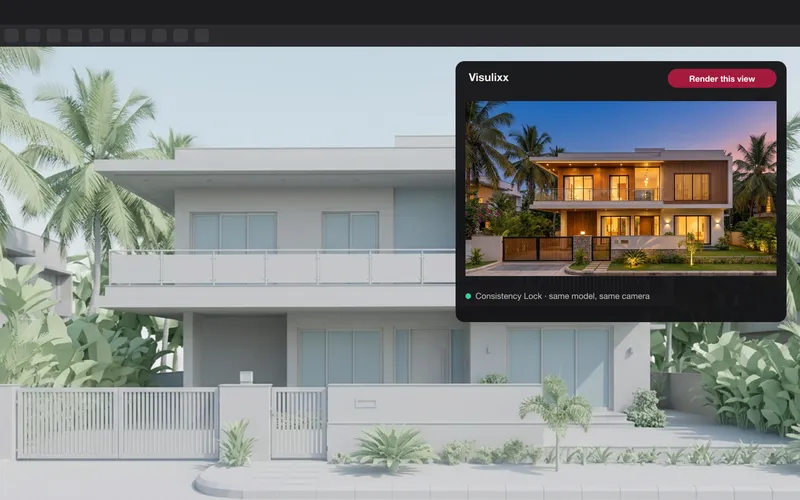 Early access
SketchUp extension
Render the current SketchUp view, or send the whole model to the 3D Studio — one click from inside SketchUp.
How it works →3D Studio · early access
Be one of the first studios in.
Tell us about your practice and we'll open the 3D Studio for you first.